Learning Goals
In this support activity you’ll become familiar with the following:
- Create a frequency table from a data set by hand.
- Create a dotplot from a data table using technology.
- Create a histogram from a data table using technology.
- Create a histogram from a data set using technology.
- Identify the most useful bin width to visualize a distribution.
.jpg)
In the next section of the course material and in the following activity, you will need to be able to use technology to make plots to visualize the distribution of quantitative variables and then use the plots to identify features of the distribution.
Let’s practice creating, reading, and interpreting quantitative distributions using a data set of information about a beloved painter and art instructor whose work aired on public television in the late 20th century.
Analyzing Bob Ross Paintings
Bob Ross was a famous painter and star of the TV show The Joy of Painting, during which viewers followed along as he painted. He (and occasionally a guest host) created a single painting in each of the [latex]403[/latex] episodes of his extremely successful show, which spanned [latex]31[/latex] seasons. He was particularly known for painting trees and clouds, which he famously called “happy little trees” and “happy little clouds,” respectively. The table below shows data for just the first [latex]13[/latex] seasons.
The objective of this analysis is to explore how many paintings included clouds in a given season. To answer this question, you’ll use technology to make plots to visualize the number of paintings that included clouds in a given season. You may use the Describing and Exploring Quantitative Variables tool or comparable technology for this assignment.
The data set “Clouds” [1] contains the following variables for each season of The Joy of Painting:
- season: Season number ([latex]1–13[/latex])
- num_clouds: Number of paintings that included clouds in the season
The following data table includes the number of paintings that included clouds, represented by the variable num_clouds, for each of the first [latex]13[/latex] seasons.
| Clouds in Bob Ross’ Paintings | |
| season | num_clouds |
| 1 | [latex]4[/latex] |
| 2 | [latex]7[/latex] |
| 3 | [latex]5[/latex] |
| 4 | [latex]5[/latex] |
| 5 | [latex]6[/latex] |
| 6 | [latex]9[/latex] |
| 7 | [latex]10[/latex] |
| 8 | [latex]7[/latex] |
| 9 | [latex]9[/latex] |
| 10 | [latex]9[/latex] |
| 11 | [latex]10[/latex] |
| 12 | [latex]8[/latex] |
| 13 | [latex]8[/latex] |
We will use this data to write a frequency table, a dotplot, and a histogram.
Frequency Tables
Below, you’ll see a partially created frequency table for the data set. Your goal is to complete the frequency table using information from the above data table.
Characteristics of the frequency table:
- The column on the left should contain, in numerical order, each number that appears in the data set num_clouds column. You’ll need to complete this column with the missing numbers. Each number is listed only once.
- The column on the right in the frequency table should contain the number of seasons in which that many paintings with clouds were created. We can see that there was only one season in which [latex]4[/latex] paintings with clouds were created, so we say the frequency of [latex]4[/latex] clouds in a painting is [latex]1[/latex].
| Frequency Table | |
| Number of Paintings with Clouds in a Season | Frequency |
| 4 | [latex]1[/latex] |
| 5 | |
| 6 | |
| 7 | |
| 8 | |
Use the interactive example below to get started then finish the table on your own in Question 1.
interactive Example
Looking back on the data table at the start of this page, we see that there were no seasons in which fewer than [latex]4[/latex] paintings with clouds were created. And we can see that only one season included exactly that many.
The frequency of [latex]4[/latex] paintings with clouds is [latex]1[/latex].
- How many seasons included [latex]5[/latex] paintings of clouds? That is, what is the frequency of [latex]5[/latex] paintings in the data set?
Show Solution
- What is the frequency of [latex]6[/latex] paintings with clouds in a season?
Show Solution
- What is the frequency of [latex]7[/latex] paintings with clouds in a season?
Show Solution
Use the answers from the interactive example above to begin filling in the frequency table in Question 1, then complete the missing information on your own. Don’t forget to look for seasons in which more than [latex]8[/latex] paintings with clouds were created.
question 1
Dotplots
In a previous activity you learned about dotplots, graphical displays for quantitative data where each dot represents an observation. Dotplots are useful for visualizing distributions when the data set is small.
Create a dotplot for the number of paintings with clouds using the data analysis tool. Follow these steps to create a dotplot with raw observations or a frequency table:
Go to the Describing and Exploring Quantitative Variables tool at https://dcmathpathways.shinyapps.io/EDA_quantitative/.
Step 1) Select the Single Group tab.
Step 2) Locate the dropdown under Enter Data and select Your Own.
Step 3) Locate the options under Do you have, and select Individual Observations.
Step 4): For Name of Variable, enter “Number of Paintings with Clouds.”
Step 5) Locate the box under the variable name and enter the observations num_clouds from the data set.
Step 6) For Choose Type of Plot Select Dotplot. Unselect any other choices that were already selected.
Step 7) Under Dotplot Options, Select Dotsize for Dotplot: 0.5 and Select Binwidth for Dotplot: 0.5.
question 2
Histograms
Typically, a histogram is more useful for large data sets. If there are a large number of observations, a histogram is easier to read, since it groups observations into bins (see this defined below) rather than having a single dot for each observation.
A histogram looks somewhat like a bar graph. But, while a bar graph displays categorical data, showing counts of observations within categories, a histogram displays quantitative data by showing frequencies of a quantitative variable. You’ll be able to tell a bar graph from a histogram by observing whether the horizontal axis appears to be a list of categories (e.g. eye color, zip code, etc…) or a number line.
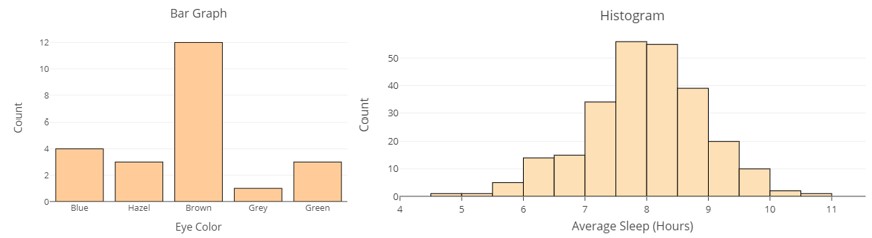
The bars of a histogram are each of the same width and meet smoothly together over the horizontal axis. The width of each bar covers a range of values along the axis called a bin.
- A bin is a range of values that the quantitative variable can take.
- A bin can be defined by its end points, the smallest and largest values of the quantitative variable represented in the bin. For the first bin [latex]\left[4 , 5\right)[/latex], the end points are [latex]4[/latex] and [latex]5[/latex]. The notation [latex]\left[4 , 5\right)[/latex] means this bin includes observations of the numbers of paintings with clouds that include [latex]4[/latex] but not [latex]5[/latex]. We knew from the frequency table that the frequency of [latex]4[/latex] paintings in a season is [latex]1[/latex], and there is a single dot above the [latex]4[/latex] on the horizontal axis to indicate this.
- The width of the bin, called binwidth, is calculated by taking the difference of the values of the end points. For the first bin, the width is [latex]5 - 4 = 1[/latex]. The width of the bins should remain the same for each graph. You can verify visually that each bin is exactly [latex]1[/latex] wide.
Interactive example
The Museum of Modern Art in New York City (the MoMA), houses, among many types of works in various mediums, over [latex]2,200[/latex] paintings. The term Modern Art covers works created from roughly between 1870 and 1979, while Contemporary Art picks up from there and carries on into the current day. The MoMA includes paintings created as early as 1872 and as late as 2018.
- These are created from various major media groups including oil, casein, acrylic, encaustic, and gouache, among others.
- Some of the less traditional media present in the paintings include earth, found objects, metal, fabric, plastics, and other materials that were classified as mixed media in the data table.
- While oil on canvas vastly dominates the media used in each decade before 2010, there was a clear increase in the variety of other media present in the MoMA collection over time. Interestingly, very few of the most recent paintings in the collection were created using oil on canvas.
The data table below indicates how many different media groups are present in paintings in the MoMA collection for each decade from 1870 to 2018. For example, for paintings created prior to 1890, oil on canvas is the only media present in the collection. It could be said that during the highly experimental decades of the 50s and the 60s that 20 different media or more were actually in use, although much of these are organized together in the table as mixed media, which reduces the number present.
| Decade Ending | Number of Different Media Groups Present |
| 1879 | 1 |
| 1889 | 1 |
| 1899 | 2 |
| 1909 | 3 |
| 1919 | 4 |
| 1929 | 5 |
| 1939 | 7 |
| 1949 | 7 |
| 1959 | 10 |
| 1969 | 10 |
| 1979 | 8 |
| 1989 | 8 |
| 1999 | 8 |
| 2009 | 9 |
| 2019 | 6 |
Here is a frequency table for the number of decades in which each number of media were used.
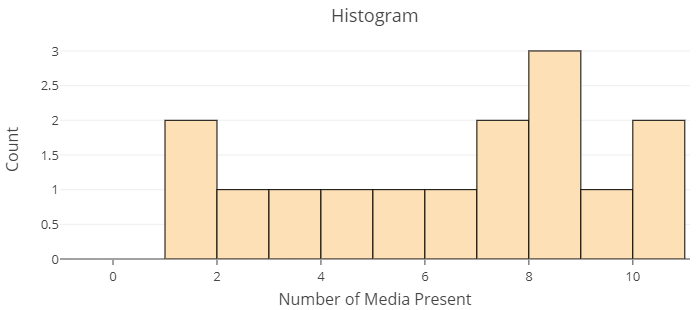
- Use the frequency table to create a histogram. Follow the steps you used above to create your dotplot, but choose Type of Plot: Histogram. For Name of Variable, use “Number of Media Present” and enter the observations in the data table. Set Binwidth = [latex]1[/latex].
Click here to reveal a completed histogram
- Which values of the variable Number of Media Present occurs most frequently in the data set?
- In how many decades were [latex]9[/latex] media present?
- In how many decades were at least [latex]7[/latex] media used?
- In how many decades were fewer than [latex]4[/latex] media used?
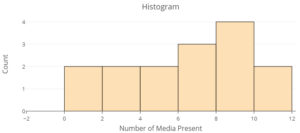
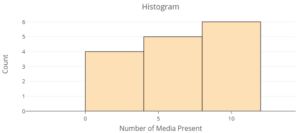
- Below are two more histograms from the same data table with different bin widths. The first has bin width of [latex]2[/latex]. The bin width in the second is [latex]4[/latex]. Which of the three histograms (including the original with bin width = [latex]1[/latex] above) do you find most helpful for understanding how frequently different numbers of media are present in the MoMA collection?
- Bin width = [latex]2[/latex]
- Bin width = [latex]3[/latex]
- Bin width = [latex]2[/latex]
Now it’s your turn to create a histogram displaying the variable num_clouds from the data set you used to create the dotplot above. Use the same data analysis tool you used above.
With the same tool still open, (or after following Steps 1 – 7 above), follow the step below to create the histogram.
Step 8) For Choose Type of Plot select Histogram option. Select Binwidth for Histogram: 1.
question 3
Now, look back to the histogram you created in Question 3 above and use it to answer the following questions.
question 4
question 5
question 6
question 7
question 8
question 9
Using Technology
Hopefully, you are feeling comfortable using histograms to answer questions about the data set given in the text above. Let’s try creating a histogram from a new data set now, then use it to answer questions. This time, you won’t need to enter the data by hand. We’ll use an existing data set in the tool.
If you don’t still have the Describing and Exploring Quantitative Variables tool open, open it at https://dcmathpathways.shinyapps.io/EDA_quantitative/ and follow these steps:
Step 1) Select the Single Group tab.
Step 2) Locate the dropdown under Enter Data and select From Textbook.
Step 3) Choose the Data Set “Hours Watching TV (2018) to create a histogram.
Step 4) Under Type of Plot, make sure the Histogram box is checked. You can uncheck any other boxes that are selected.
Step 5) Select Binwidth = 2.
Bin Width
The data set “Hours Watching TV (2018)” in the Describing and Exploring Quantitative Variables tool has the weekly number of hours spent watching TV for [latex]1,555[/latex] individuals. Create a histogram with binwidth = 2 to display the distribution of the variable. Use it to answer the questions below.
question 10
question 11
question 12
Candela Citations
- Used paint brushes and opened yellow, blue, red, and black paint tubes on a wooden floor with paint splattered on it.. Authored by: Andrian Valeanu. Provided by: Wikimedia Commons. Located at: https://commons.wikimedia.org/wiki/File:Andrian_Valeanu_2016-04-11_(Unsplash).jpg. License: CC0: No Rights Reserved
- Hickey, W. (2014, April 14). A statistical analysis of the work of Bob Ross. FiveThirtyEight. https://fivethirtyeight.com/features/a-statistical-analysis-of-the-work-of-bob-ross/ ↵