goals for this section
After completing this section, you should feel comfortable performing these skills.
- Determine which variables are categorical from raw data.
- Read and interpret a frequency table
- Use a data analysis tool to create a frequency table from a dataset
- Read and interpret a bar graph.
- Use technology to create a bar graph from a dataset.
- Read and interpret a pie chart.
- Use technology to create a pie chart from a dataset.
Click on a skill above to jump to its location in this section.
When describing data using graphical representations, certain variables in the data are appropriate for certain visualizations. To prepare for the upcoming activity, you will need to identify variables that would be appropriate for bar graphs and pie charts and answer research questions by reading bar graphs and pie charts. To do this, you will need to be able to determine which variables in a dataset are categorical, understand how frequency tables are formed, and understand how bar graphs and pie charts are formed.
Categorical Variables
In a previous section (1C), you learned the difference between categorical and quantitative variables. Let’s take a moment to refresh that information before diving into a deep exploration of categorical variables.
Recall
What is the distinguishing feature of a categorical variable? That is, how can we tell a categorical variable apart from a quantitative variable?
Core Skill:
Practice identifying categorical variables in a list in the interactive example. Then, for the data table that follows, identify the categorical variables to answer Question 1.
Interactive Example
Which variable(s) in the list below are categorical?
Age, marital status, number of children in the household, zip code, income, education level
Now it’s your turn to practice what you know by looking at a real dataset obtained from a survey and displayed in the table below. Read the information given about the dataset and its variables, then answer the questions that follow.
Identify Categorical Variables in a Dataset
identifying characteristics of a categorical variable
[Perspective Video — a 3-instructors video illustrating the identifying characteristics of a categorical variable in raw data.)
In 2013, students of the statistics class at FSEV UK, a Slovakian University, were asked to invite their friends to participate in a survey[1]. Data for the first 15 out of 1,007 young people who completed the survey are displayed below.
| Young People Survey |
|||||||
| Alcohol | Age | Height | Punctuality | Number of siblings | Enjoy Music 1=strongly disagree, 5=strongly agree | Internet usage | Left – right handed |
| drink a lot | 20 | 163 | I am always on time | 1 | 5 | few hours a day | right handed |
| drink a lot | 19 | 163 | I am often early | 2 | 4 | few hours a day | right handed |
| drink a lot | 20 | 176 | I am often running late | 2 | 5 | few hours a day | right handed |
| drink a lot | 22 | 172 | I am often early | 1 | 5 | most of the day | right handed |
| social drinker | 20 | 170 | I am always on time | 1 | 5 | few hours a day | right handed |
| never | 20 | 186 | I am often early | 1 | 5 | few hours a day | right handed |
| social drinker | 20 | 177 | I am often early | 1 | 5 | less than an hour a day | right handed |
| drink a lot | 19 | 184 | I am always on time | 1 | 5 | few hours a day | right handed |
| social drinker | 18 | 166 | I am often early | 1 | 5 | few hours a day | right handed |
| drink a lot | 19 | 174 | I am often running late | 3 | 5 | few hours a day | right handed |
| social drinker | 19 | 175 | I am often early | 2 | 5 | less than an hour a day | left handed |
| never | 17 | 176 | I am often running late | 1 | 5 | few hours a day | right handed |
| social drinker | 24 | 168 | I am often running late | 10 | 5 | few hours a day | right handed |
| social drinker | 19 | 165 | I am often early | 1 | 5 | few hours a day | right handed |
| social drinker | 22 | 175 | I am often early | 1 | 5 | most of the day | right handed |
The following eight variables are included in the dataset. The variable names are presented in italics, followed by a brief description. You may recall from Forming Connections in (1D) that this is often called a data dictionary.
- Alcohol: “never,” “social drinker,” or “drink a lot”
- Age: Years
- Height: Height in centimeters (cm)
- Punctuality: “I am often early,” “I am often on time,” or “I am often running late”
- Number of siblings
- Enjoy music: Participants were asked “Do you enjoy music?” and reported on a 5-point Likert scale: strongly disagree = 1, strongly agree = 5
- Internet usage: “no time at all,” “less than an hour a day,” “few hours a day,” or “most of the day”
- Left – right handed
Question 1
Frequency Tables
A frequency table lists the number of observations (the frequency) of each unique value of a categorical variable. The frequency is commonly referred to as the count. See the example below, which illustrates a partially complete, simple frequency table for a survey in which 20 people were asked to answer a question by choosing one of four responses: strongly disagree, disagree, agree, or strongly agree.
| Variable Name | Frequency (number of times each response appears in the dataset) |
| Strongly disagree | 2 |
| Disagree | 5 |
| Agree | 9 |
| Strongly agree |
Interactive example
For the frequency table above, answer the following questions
a) If 20 responses were collected in the survey, how many people responded with “Strongly agree?”
b) What is the total frequency for the table?
Read and interpret a frequency table
Frequency tables often include a column for the relative frequency. The relative frequency represents the proportion of observations that are in a particular category and can be expressed as a decimal or a percentage. To find relative frequency, divide the count of a particular category by the sum of all the counts. See the recall box below for a refresher on how to convert ratios to proportions and percentages. Also see the Student Resources: Fractions, Decimals, Percentages and Ratios and Fractions.
Recall
When calculating relative frequencies, you’ll need to convert a proportion to a percent. You’ve probably done this before, so this should be a refresher.
Click the link below to see how to convert the fraction [latex]\dfrac{2}{15}[/latex] to a proportion and then to a percentage.
Core Skill:
creating a frequency table
[Worked Example — a 3-instructors worked example of creating a frequency table for a categorical variable identified from a data table. )
The following frequency table displays the frequency and relative frequency (as a decimal and a percentage) of the categorical variable Alcohol for the first 15 young people who responded to the survey.
| Alcohol | Frequency | Relative Frequency | Percent (%) |
| Never | 2 | 2/15 = 0.1333 | 13.33 |
| Social drinker | |||
| Drink a lot |
question 2
Complete the frequency table above. To find the frequency, look back at the first data table. Round relative frequencies to four decimal places and the corresponding percentages to two decimal places.
Use technology to create a frequency table from a dataset
Displaying frequency tables for small datasets might be feasible by hand, but we need technology to display frequency tables for larger datasets.
Let’s use technology to create a frequency table to understand the variable Enjoy Music for all 1,007 students included in the survey. Follow these steps:
Go to the data analysis tool Describing and Exploring Categorical Data at https://dcmathpathways.shinyapps.io/EDA_categorical/
Step 1) Select the One Categorical Variable tab.
Step 2) Locate the dropdown under Enter Data and select From Textbook.
Step 3) Locate the dropdown under Dataset and select Young Adults: Enjoy Music. The frequency table will appear to the right. It will be easier to read if the categories are presented in order. Follow Steps 4 and 5 below to rearrange it if needed.
To rearrange the frequency table in numerical order from 1 to 5:
Step 4) Select the Customize Order box under Options.
Step 5) Locate the Choose Order of Categories box and sequentially select 1, 2, 3, 4, and 5.
Refer to the frequency table you just created to answer Questions 3 and 4.
question 3
How many surveyed young adults strongly disagreed that they enjoy music?
question 4
What percentage of young adults surveyed strongly agreed that they enjoy music?
When exploring categorical data, it is helpful to convert the data from tables into charts or graphs. Bar graphs and pie charts provide visual summaries of data that help us quickly identify how the individual category frequencies relate to one another and to the total count.
Bar Graphs
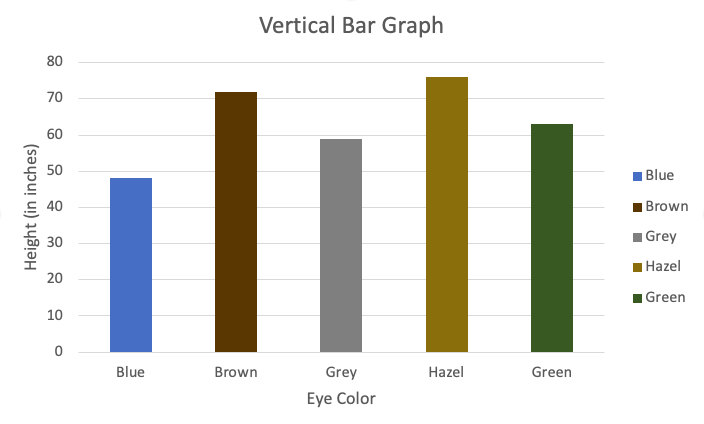
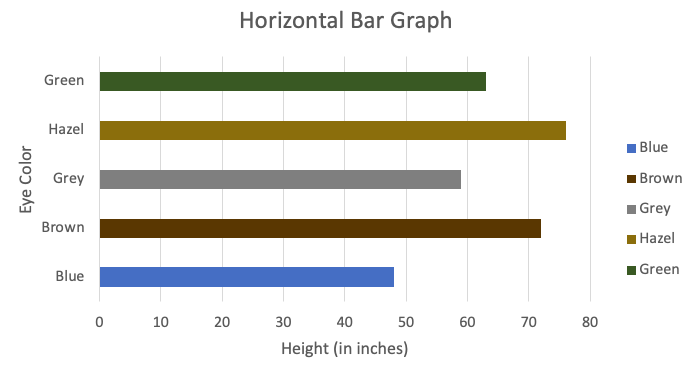
One of the most commonly used graphs for visualizing the distribution of a categorical variable is a bar graph. In a bar graph, categories are represented by bars that are separated from each other. The bars can be vertical or horizontal, and the height (or length) of each bar represents the measure of the data in each category. Bars can represent frequencies, relative frequencies (proportion), or percentages.
Read and interpret a bar graph
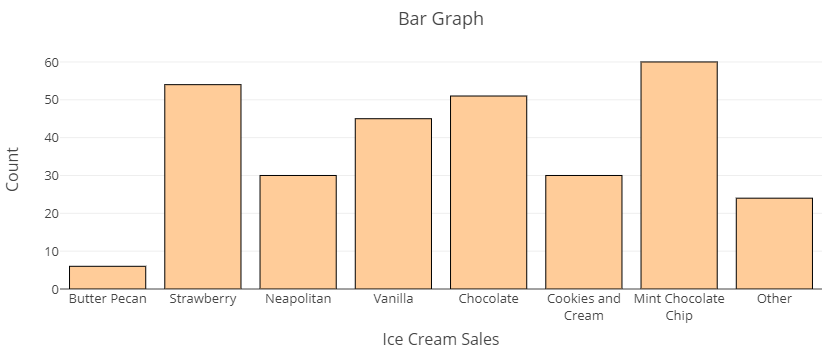
The bar graph below displays the number of cones each of a small ice cream shop sold on the 4th of July. Note that the counts (numbers of cones) are listed on the vertical axis while each flavor sold is listed along the horizontal axis. Examine the graph, then answer the questions in the Interactive Example that follows.
Interactive example
Use the Ice Cream Flavors bar graph above to answer these questions.
a) Which flavor sold the fewest number of cones?
b) About how many cones of Neapolitan ice cream were sold?
Now that you have had a chance to become familiar with this categorical visualization, follow the directions below to use technology to create a bar graph for a real dataset.
Use technology to create a bar graph from a dataset
Recall the frequency table you created earlier in this section using the Describing and Exploring Categorical Data tool. When you used the technology tool to create the frequency table, a bar graph was also created on that page. Let’s go back to the tool to explore the bar graph. If you still have the tool open for this dataset, just follow steps 4 and 5 below to view the bar graph.
Go to the data analysis tool Describing and Exploring Categorical Data at https://dcmathpathways.shinyapps.io/EDA_categorical/
Step 1) Select the One Categorical Variable tab.
Step 2) Locate the dropdown under Enter Data and select From Textbook.
Step 3) Locate the dropdown under Dataset and select Young Adults: Enjoy Music.
See the bar graph under the frequency table on the tool page. You can change the appearance of the graph using the Options selections. You can show counts or percentages on the vertical axis or in the bars, change the bars from vertical to horizontal, customize order, and even change the color of the bars in the Modify/Include section. Let’s explore how to change the bars from vertical to horizontal and then change the horizontal axis from Count to Percent (%).
Step 4) Click the Horizontal Bars box to change the perspective of the graph from counts as bar-heights to bar-lengths. Note how the Count range switches from the vertical axis to the horizontal axis.
Step 5) Click the Show Percent box to change the heights (or lengths of horizontal bars) from counts to percentages. Note how the Count range switches to Percent (%).
Take a moment to explore switching these options back and forth to see how the graph changes then answer Question 5 below.
question 5
Pie Charts
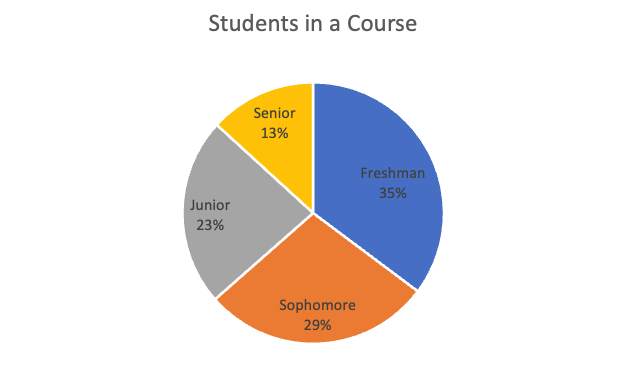
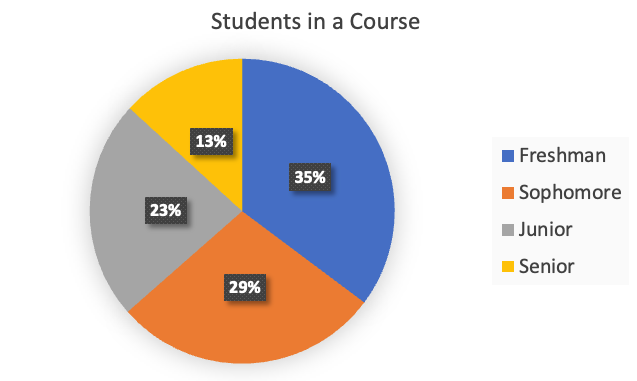
Another common graph used for displaying the distribution of categorical data is a pie chart. In a pie chart, categories are represented by wedges in a circle and are proportional in size to the percentage of individuals/items in each category. There are several ways to present pie chart data visually. A pie chart may include all the information needed to read it within each wedge or they may provided some image in the chart and some in a key off to the side.
Read and interpret a pie chart
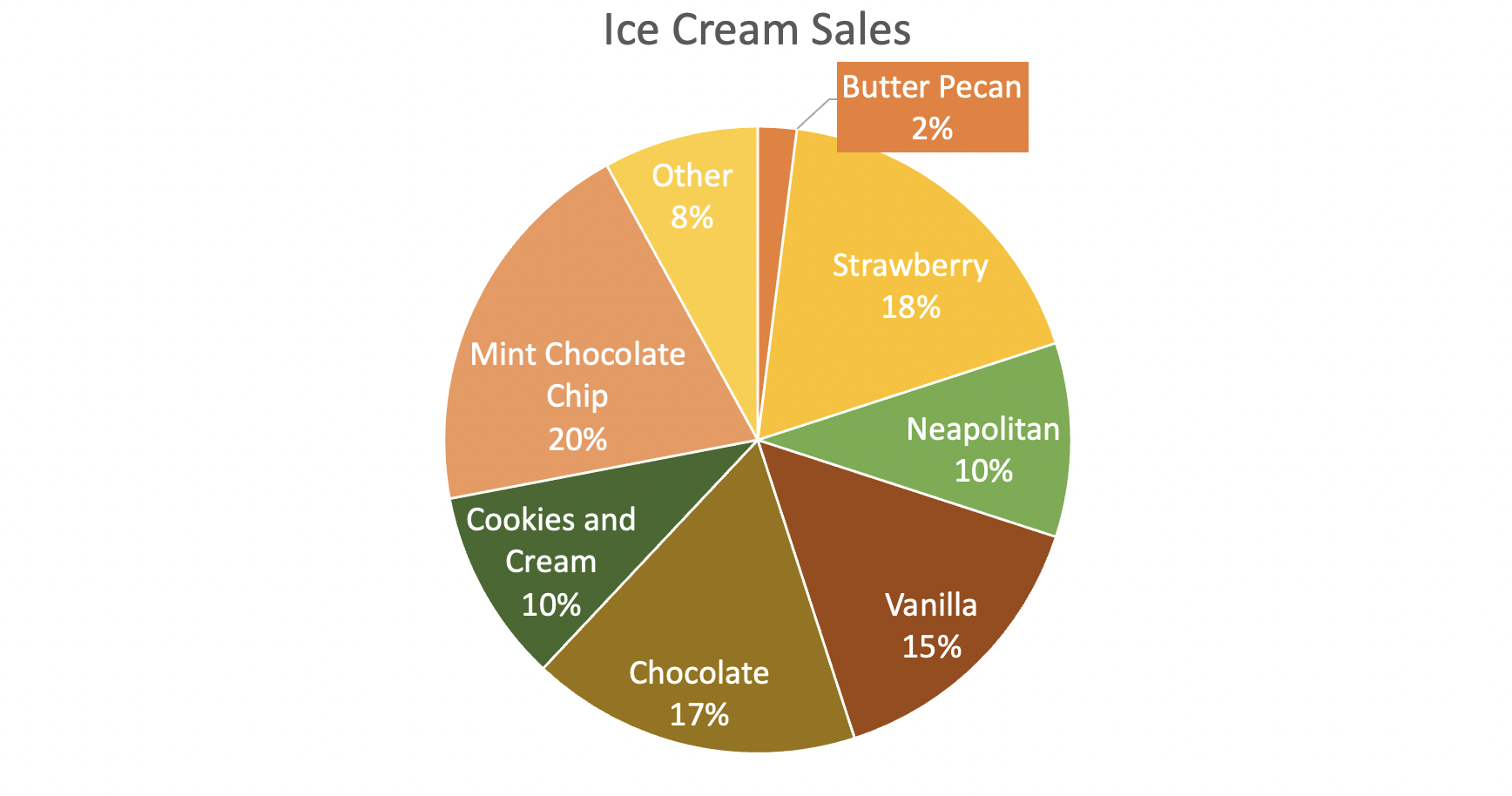
Pie charts are useful for showing percentages (parts of a whole) at some particular instance in time. For example, the following chart displays flavors of ice cream sold at an ice cream shop as a percentage of all ice cream sales on July 4th. This chart contains the same information as the bar chart does above, but shows percentages rather than counts.
Interactive example
Use the chart above to answer the following questions.
a) What flavor made up the largest percentage of ice cream sales?
b) What percent of sales was attributed to strawberry ice cream?
Use technology to create a pie chart from a dataset
When you used the Describing and Exploring Categorical Data data tool to create the frequency table and bar graph, you also had the option to create a pie chart. Let’s do that now. If you still have the tool open, skip to Step 4 below.
Go to the data analysis tool Describing and Exploring Categorical Data at https://dcmathpathways.shinyapps.io/EDA_categorical/
Step 1) Select the One Categorical Variable tab.
Step 2) Locate the dropdown under Enter Data and select From Textbook.
Step 3) Locate the dropdown under Dataset and select Young Adults: Enjoy Music.
Step 4) Under the Additional Plots section, select Pie Chart. Scroll down to see the pie chart on the page under the bar graph.
question 6
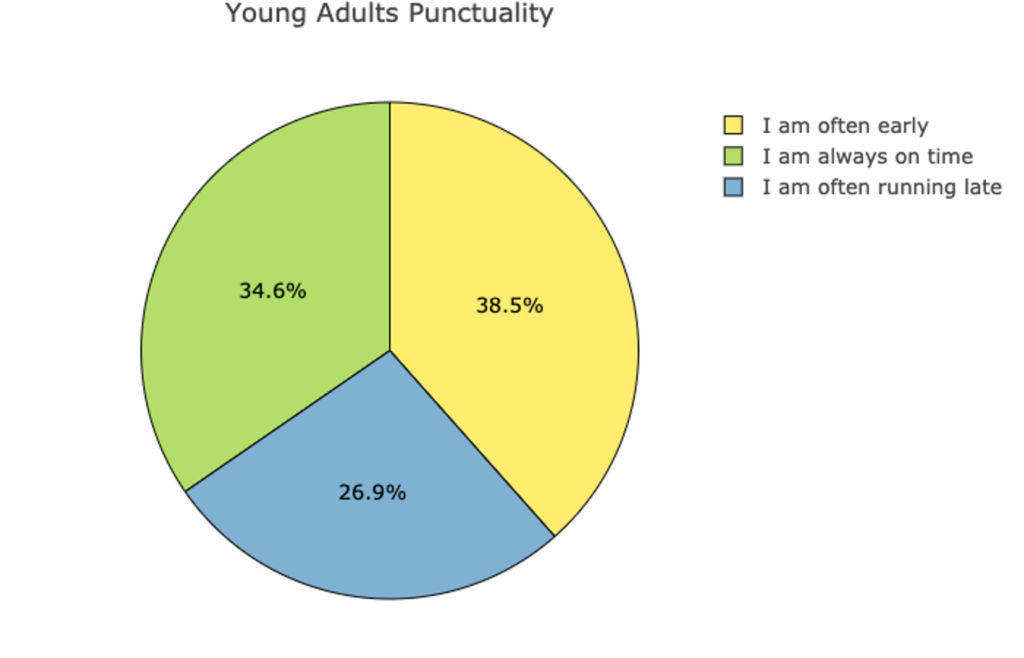
It’s difficult to visualize a summary of the Enjoy music categories since just one or two of them dominate the chart. Let’s leave the tool now and explore another one of the variables from the dataset: Punctuality. The following pie chart displays the distribution of the categorical variable Punctuality. Use this pie chart to answer Questions 6 and 7 below.
question 7
According to the pie chart, what percentage of surveyed young adults said they are often running late?
question 8
What percentage of surveyed young adults said they are often early or always on time?
Summary
In this preview section, you’ve had a chance to practice the tasks that will be essential to forming deeper connections in the next activity. This is a good time to sum it all up before moving on.
- In question 1, you identified categorical variables from a list of variables appearing in raw data.
- In question 2, you completed a frequency table from raw data by hand.
- In question 3, you used technology to create a frequency table from raw data.
- In question 4, you used technology to create and manipulate a graph of categorical data from a frequency table.
- And in questions 3 – 5, you read a frequency table, a bar graph, and a pie chart to make observations about categorical data.
You’ve seen in this section that frequency tables, bar graphs, and pie charts are all good tools for visualizing categorical data. If you feel comfortable with these ideas, it’s time to move on!
- Young people survey. (2016, December 6). Kaggle. Retrieved from https://www.kaggle.com/miroslavsabo/young-people-survey ↵